The State Machine
Before diving into the code, let’s visualize our simple door state machine. This will help you understand the structure we’re about to implement.
State Diagram
The state diagram below shows all possible states and the valid transitions between them:
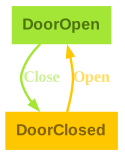
In this diagram, you can see:
- Two states:
DoorOpenandDoorClosed(shown as rectangles) - Two transitions:
CloseandOpen - Arrows: The direction of each arrow shows which state changes are valid
Transition Table
For a more structured view, here’s the corresponding transition table:
| State | Message | State | ||
|---|---|---|---|---|
| DoorOpen | ⟶ | Close | ⟶ | DoorClosed |
| DoorClosed | ⟶ | Open | ⟶ | DoorOpen |
Each row shows one valid transition: which state you start in, which action you take, and which state you end up in. Notice that invalid actions — like trying to open an already open door — simply don’t appear in the table.
Now let’s see how we represent this in PureScript code.