Generating documentation
Until now we always used automatic layouts for the state diagram.
This is super convenient because you don’t have to worry about the
layout at all. Sometimes you want more control over the layout. Luckily
we can also position the nodes manually by using the Manual
layout. We’ll do this here to make our state diagram look exactly like
the drawing of the house of Santa Claus.
Let’s do a quick sketch in a 2D grid. The nodes are positioned at the following coordinates:
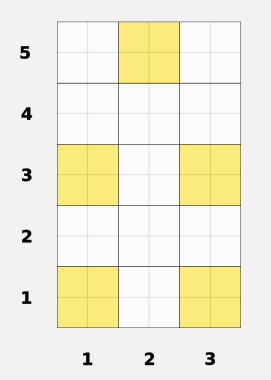
For historical reasons, the Graphviz renderer wants positions to be defined in inches. We want to use 0.6 inches as the base unit and have all positions be a multiple of that. This number is an arbitrary choice and you can adjust it to increase or decrease the size of the graph.
baseUnit :: Inch
baseUnit = Inch 0.6Since we’ll need vectors of inches to position the nodes, we define a helper function to create them as multiples of the base unit.
units2D :: Int -> Int -> { x :: Inch, y :: Inch }
units2D x y =
  { x: Inch (Int.toNumber x * unwrap baseUnit)
  , y: Inch (Int.toNumber y * unwrap baseUnit)
}Finally we can generate the graph with the
generateGraphDark function and define the nodes positions
in the options of the Manual layout. The exact
boolean means that the position is exact and not meant as just a hint
for the layout algorithm.
generateGraphDark :: Effect Unit
generateGraphDark = do
  let
    graph :: GraphvizGraph
    graph = TransitGraphviz.generate santaTransit _
      { undirectedEdges = true
      , theme = themeHarmonyDark
      , layout = Manual
          [ { node: "1", pos: units2D 0 0, exact: true }
          , { node: "2", pos: units2D 2 0, exact: true }
          , { node: "3", pos: units2D 2 2, exact: true }
          , { node: "4", pos: units2D 0 2, exact: true }
          , { node: "5", pos: units2D 1 4, exact: true }
          ]
      , fixedNodeSize = pure $ units2D 1 1
      , fontSize = 14.0
      }

  FS.writeTextFile UTF8
    "renders/house-santa-claus_graph-dark.dot"
(Graphviz.toDotStr graph)Generated Output: This generates the diagram we saw at the beginning of this example.
🔗 View diagram on GraphvizOnline
Note that the size of the nodes is also fixed to a multiple of the base unit. In this way we can better control the position in the grid we drew at the beginning.